Compliance Frameworks & Continuous Monitoring
PAM-Pro provides continuous, real-time compliance governance that bridges operational identity management with major regulatory frameworks. Rather than treating compliance as a stressful periodic audit snapshot, PAM-Pro continuously monitors your privileged identity posture, detects policy violations the moment they occur, and maintains auditor-grade evidence automatically.
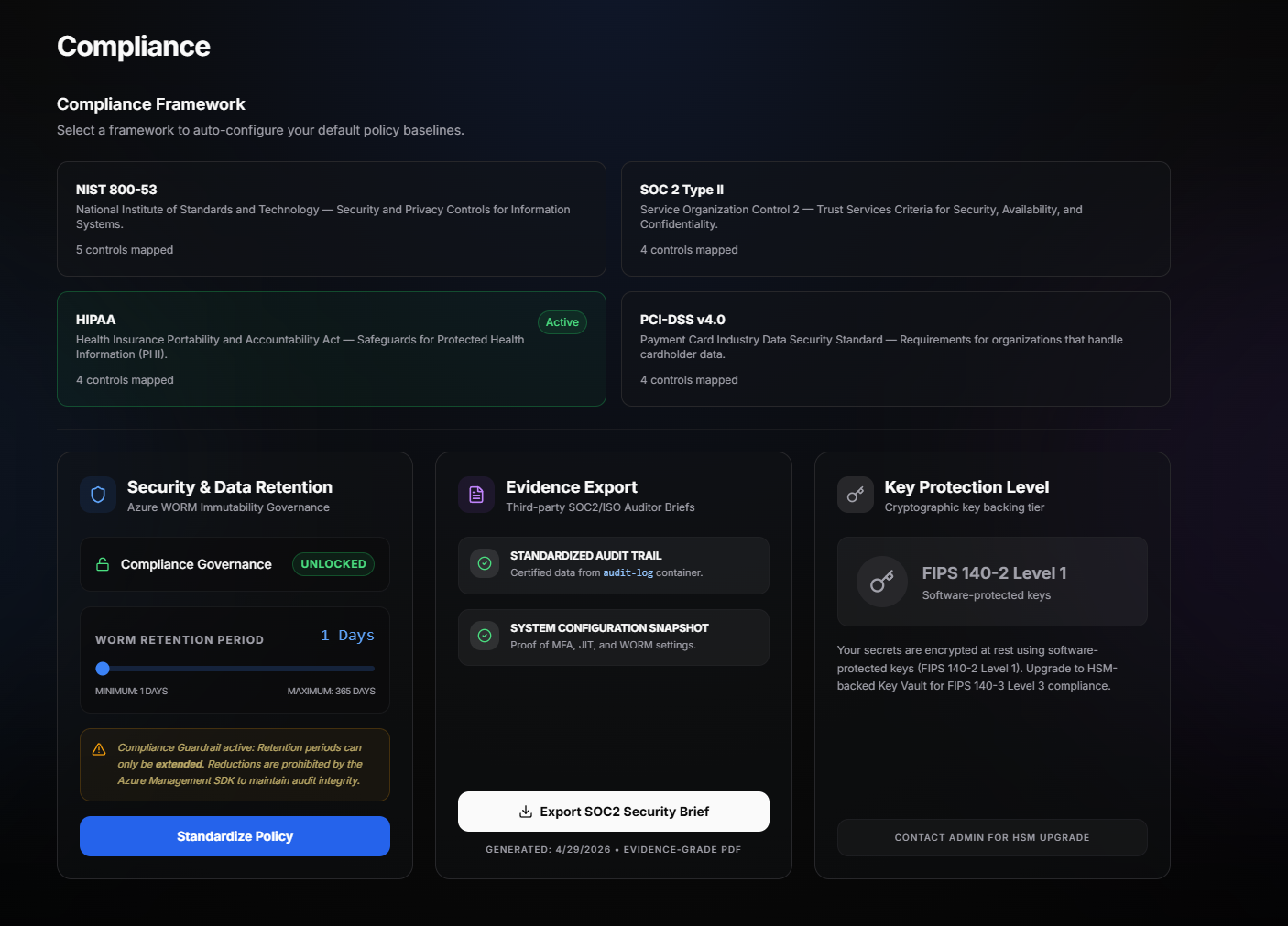
Supported Compliance Frameworks
PAM-Pro provides out-of-the-box control mappings for four major industry frameworks:
- NIST SP 800-53 Rev. 5: Mapped to access enforcement (AC-6), multi-factor identification (IA-2), event logging (AU-2), log generation & WORM protection (AU-12), and credential management (SI-12).
- SOC 2 Type II: Satisfies Trust Services Criteria across CC6.1 (access security), CC6.2 (credential provisioning), CC6.3 (least privilege & JIT access), and CC7.2 (security anomaly monitoring).
- HIPAA Security Rule: Enforces Technical Safeguards 164.312(a)(1) (unique user identification), 164.312(a)(2)(iii) (emergency access procedures), and 164.312(b) (audit controls).
- PCI-DSS v4.0: Addresses Requirement 7 (restricting access by business need), Requirement 8 (identifying users and authenticating access), and Requirement 10 (log tracking and immutability).
Continuous Compliance Scorecard
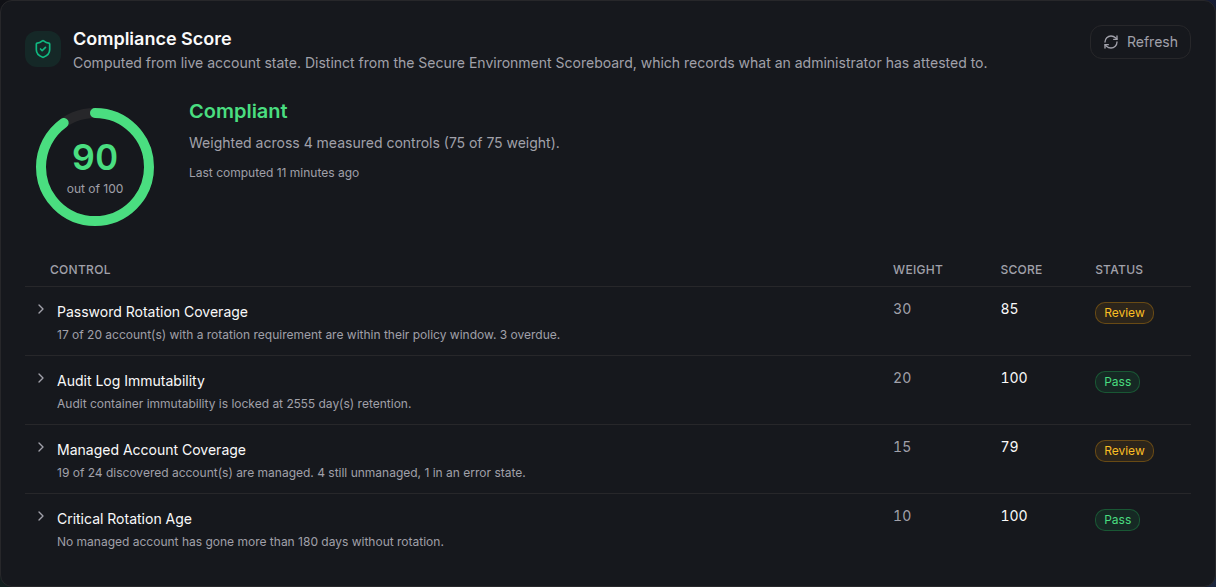
At the top of the Compliance Dashboard, PAM-Pro computes a dynamic 0 to 100 Compliance Score evaluated across four continuously measured security controls:
- Rotation Coverage: Measures the percentage of managed accounts whose passwords have been rotated within their policy-mandated window. Accounts without a rotation cadence are excluded from the denominator.
- Audit Log Immutability (WORM): Confirms that audit storage is write-locked with Write-Once, Read-Many policies enforced at the storage tier. Only locked policies achieve a 100% score; unlocked or unconfigured policies are flagged.
- Managed Account Coverage: Assesses the proportion of discovered privileged accounts currently governed by active PAM-Pro policies.
- Critical Rotation Check (180-Day Ceiling): Enforces an absolute safety ceiling requiring any privileged credential older than 180 days to fail outright, regardless of policy exemptions.
Provisional Score Rating
To avoid false security confidence during initial rollout, PAM-Pro requires a minimum 50% data coverage threshold. If a newly provisioned tenant has only a small fraction of controls measurable, the score displays as Provisional until sufficient directory data is gathered.
Real-Time Violation Alerts
When an account or configuration deviates from compliance baselines, an active Violation Alert Banner appears at the top of the dashboard. Detected violation types include:
ACCOUNT_UNMANAGED: A discovered privileged account that has remained unmanaged past the discovery grace period.ROTATION_OVERDUE: A managed account whose credential age exceeds its assigned policy window.CRITICAL_ROTATION_OVERDUE: A credential that has not been rotated for over 180 days.WORM_NOT_CONFIGURED: Audit storage lacking immutable retention protection.

Administrators can expand any violation row to inspect affected account UPNs and trigger an immediate inline Rotate Now action to resolve the finding.
Compliance Score History & Trends
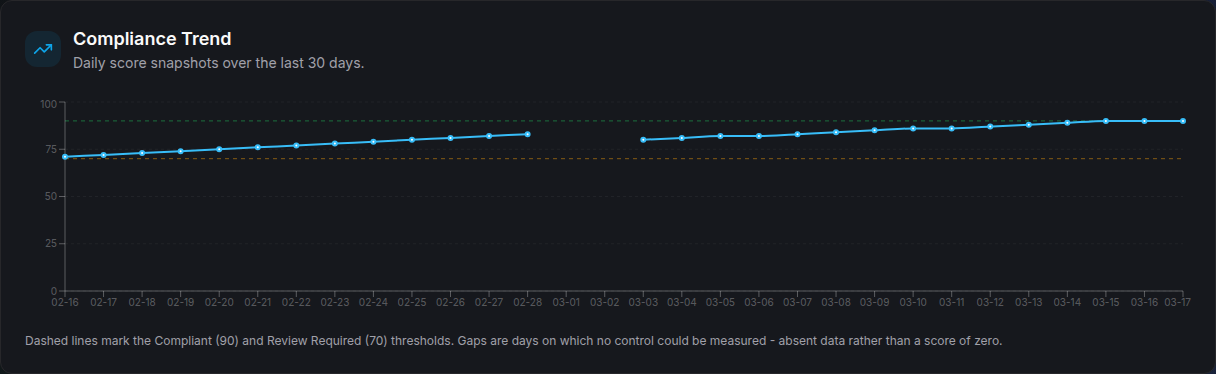
The Score History Trend Chart records daily posture snapshots over 30, 60, and 90-day intervals. This provides executive stakeholders and auditors with verifiable historical evidence demonstrating that compliance controls remained effective over time.
© 2026 Huntoso LLC. All rights reserved.