Security and Data Retention
PAM-Pro is built on a security-first architecture where your keys never leave your environment. This page documents the cryptographic standards, data handling practices, audit retention model, and access control requirements for your deployment.
Key Architecture - You Own the Keys
PAM-Pro does not hold encryption keys. Each customer environment is provisioned with a dedicated Azure Key Vault in your own tenant. All vaulted credentials are encrypted using keys that only your environment can access. PAM-Pro's orchestration layer generates deterministic secret names and coordinates rotations, but cannot independently decrypt your secrets without your Key Vault being available and your identity context being valid.
This means there is no single point of compromise on the Huntoso side. Even a full breach of Huntoso's SaaS platform cannot expose your vaulted credentials.
Cryptographic Standards
The cryptographic protection level depends on your subscription tier:
- Standard (SaaS Teams / SaaS Pro / On-Premise): FIPS 140-2 Level 1 compliance. Keys are software-protected and stored in Azure Key Vault Standard tier. AES-256 encryption at rest, TLS 1.3 in transit.
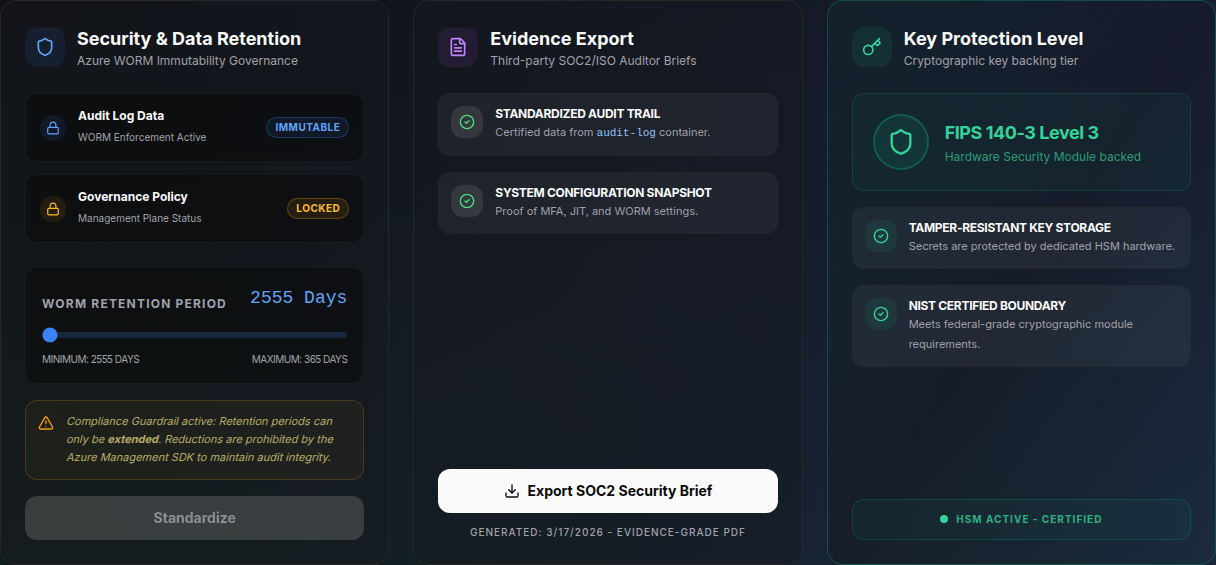
- HSM Add-on: FIPS 140-3 Level 3 compliance. Keys are hardware-protected in Azure Key Vault Premium or Azure Managed HSM. Physical tamper-resistance with full key sovereignty. No key material is ever exported to software-accessible memory.
All connections between PAM-Pro and Azure services use TLS 1.3. Fallback to TLS 1.1 or 1.2 is blocked. This is verifiable via the Security Scoreboard.
WORM Audit Retention (Write-Once, Read-Many)
All privileged access events - elevation requests, approvals, rejections, revocations, and password rotations - are written to an Azure Blob Storage container with immutability policies applied.
- Default retention window: 1 day. Adjustable from 1 to 365 days via Settings › Compliance.
- Compliance Guardrail: Once a retention period is set, it can only be extended - never shortened. The Azure Management SDK enforces this at the storage layer. This ensures audit integrity and satisfies SOC2, HIPAA, and NIST chain-of-custody requirements.
- Evidence export: Auditors receive time-stamped, cryptographically signed export bundles from the
audit-logcontainer. See the Compliance Frameworks page for evidence export details.
SSO and Conditional Access
PAM-Pro authenticates all users through Microsoft Entra ID. SSO configuration is required before Conditional Access policies can enforce security controls on PAM-Pro access. Without an active SSO configuration tied to your Entra tenant, Conditional Access policies (MFA enforcement, device compliance, location restrictions) cannot be applied to PAM-Pro sessions.
See the SSO Configuration guide to complete this step. Skipping SSO setup will result in reduced scores on the Security Scoreboard for identity-related hardening checks.
Data Residency
PAM-Pro is currently deployed in United States Azure regions only. All compute, storage, and Key Vault resources are provisioned in US regions. EU data residency is not supported at this time.
Retention Expiry and Data Deletion
Once audit logs exit the configured retention window, they are eligible for deletion. Automated cleanup processes remove expired log blocks. Cryptographic key material in your Key Vault is governed by your own Key Vault expiry and purge protection policies, which you control independently of PAM-Pro.
Note on cancellation: Billing stops when you cancel. If your audit log container has a locked WORM retention policy, the logs cannot be deleted before that policy expires, so they stay in immutable storage at no charge until the retention window closes and are then purged. Download your evidence pack and audit export before canceling if you need them. See the pricing page for full terms.
© 2026 Huntoso LLC. All rights reserved.