Managing Tenants & Multi-Directory Governance
PAM-Pro is engineered from the ground up for multi-tenant governance. Whether you are managing multiple enterprise business units, regional Entra ID directories, or functioning as an MSSP managing distinct client organizations, PAM-Pro maintains strict cryptographic and operational isolation across every tenant boundary.
Multi-Tenant Architecture
PAM-Pro decouples the administrative governance plane from individual client directories:
- Dedicated Azure Key Vaults & WORM Storage: Each onboarded tenant maintains its own isolated credential vault and tamper-proof audit container, protected by a unique Tenant Root Key (TRK).
- Cross-Tenant Microsoft Graph Integration: PAM-Pro interacts with target Entra ID directories using certificate-based Workload Identity Federation (WIF) or multi-tenant Enterprise Applications, requiring no standing client secrets.
- Tenant Context Switching: Administrators can switch organizational contexts instantly via the top-right tenant dropdown, scoping accounts, discovery groups, audit logs, and compliance scorecards to that specific boundary.
The Tenant Management Console
To inspect and manage configured tenant environments, navigate to Settings › System and locate the Tenants panel. This table displays:
- Tenant Name & ID: The display alias and unique Microsoft Entra Directory GUID.
- Primary Contact: Administrative contact email used for compliance reports and critical notifications.
- Onboarding Status: Indicates whether administrative consent and directory role assignments are complete.
- Live Verification Status: Real-time confirmation of Graph API connectivity and permissions.
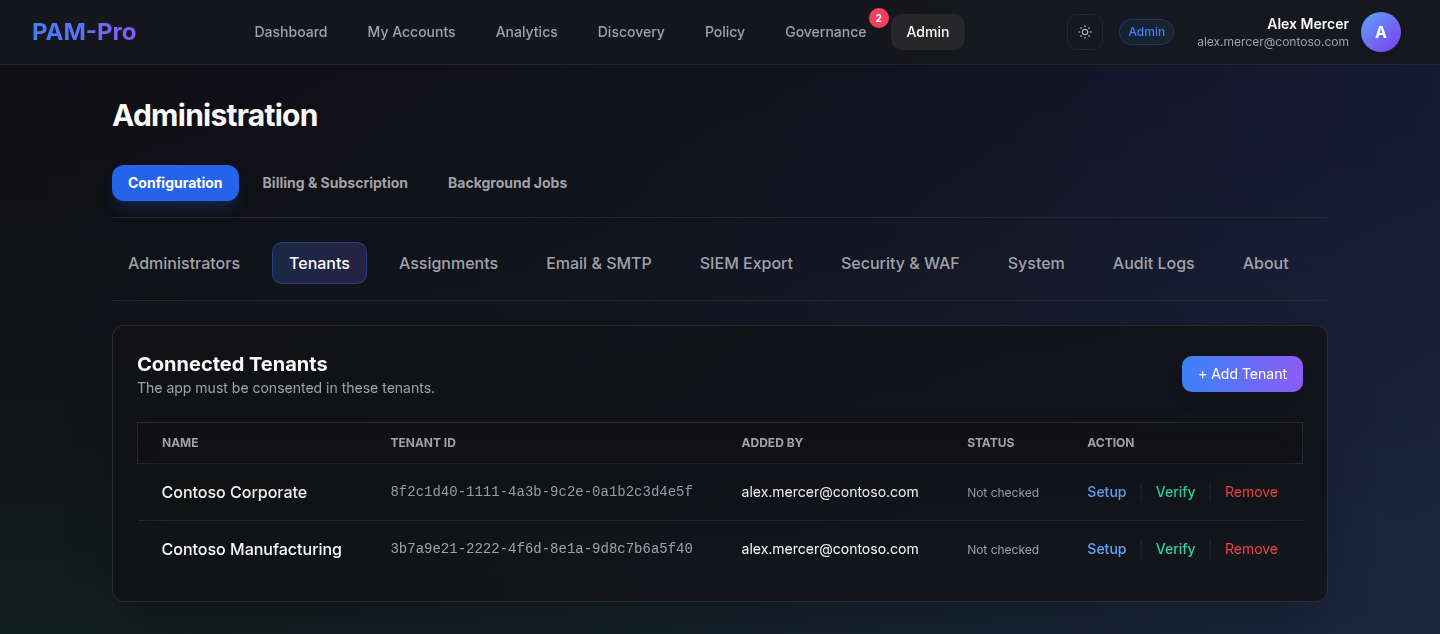
Live Tenant Verification
Introduced in Version 3.13.2, PAM-Pro features automated Live Tenant Verification (POST /api/tenants/:tenantId/verify). Rather than relying on static checkboxes or cached assumptions, administrators can click Verify on any tenant row to test live readiness in real time:
- Graph API Reachability: Requests an application token and checks
/organizationaccess against the target Entra tenant. This confirms administrative consent was granted and the Service Principal exists. - Service Principal Resolution: Resolves the target tenant's Service Principal Object ID required for role assignments.
- Directory Role Verification: Inspects active directory role assignments to confirm the Service Principal holds both required administrative roles:
- Global Reader: Required for account discovery, hybrid attribute inspection, and directory synchronization reads.
- Privileged Authentication Administrator: Required to rotate credentials and execute emergency password resets for privileged accounts.
Zero-Cache Integrity: Verification results are evaluated live and are never persisted as a static green checkmark. If an administrator revokes a directory role or consent in Entra ID, the next verification check immediately detects the gap.
De-Provisioning & Data Retention
When offboarding an organizational boundary, select the tenant and click Terminate Governance. PAM-Pro securely purges the cached configuration and removes active discovery schedules. To satisfy legal compliance mandates, existing Write-Once, Read-Many (WORM) audit blobs remain locked within the tenant's Azure storage account according to their defined retention policy.
© 2026 Huntoso LLC. All rights reserved.